CDR E.164 Validator
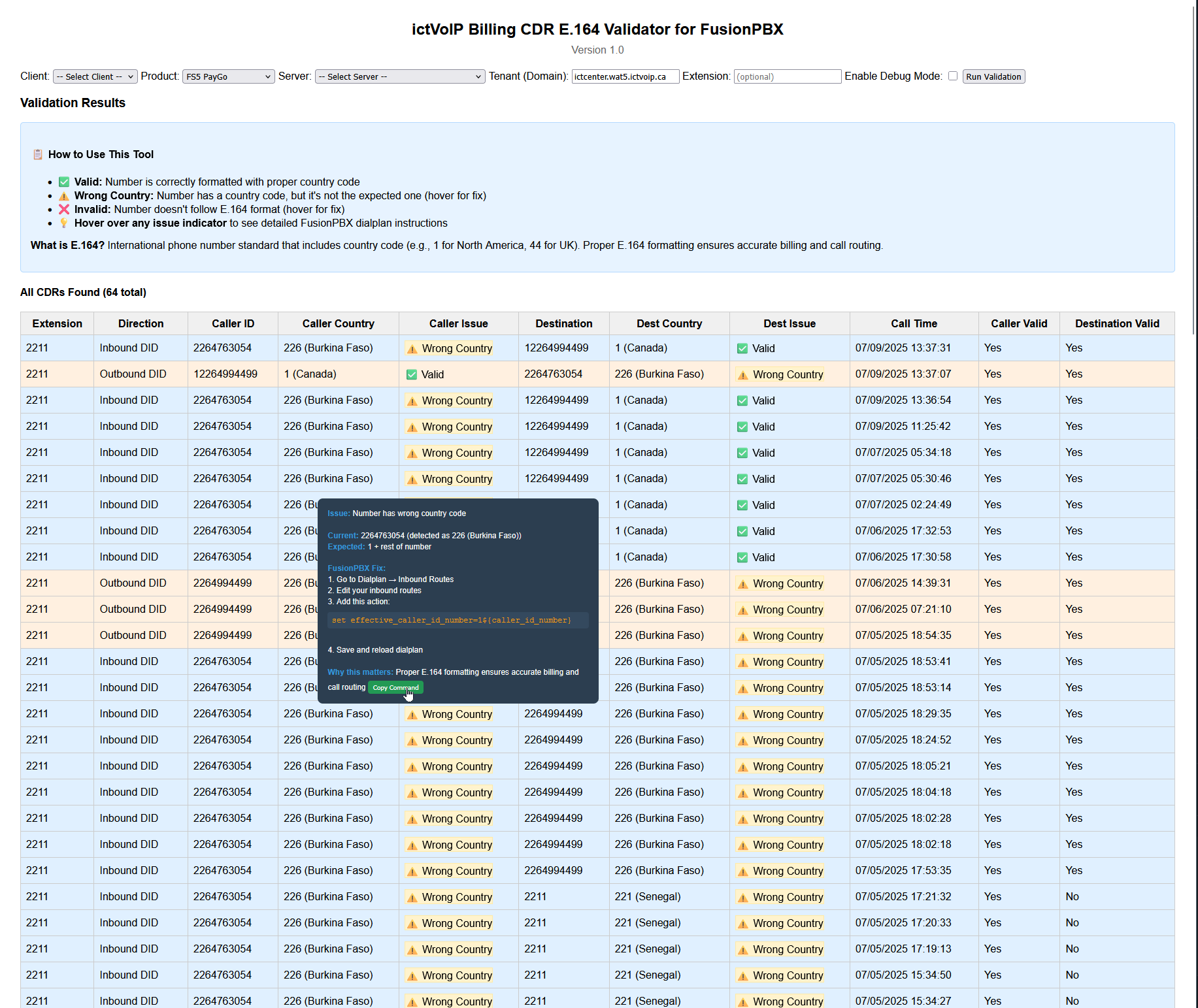
Figure: The ictVoIP Billing CDR E.164 Validator for FusionPBX, showing validation results and detailed tooltips for dialplan fixes.
ictVoIP Billing Administration & Configuration
The CDR E.164 Validator is a powerful tool integrated with the ictVoIP Billing system that validates Call Detail Records (CDRs) from FusionPBX to ensure proper E.164 international phone number formatting. This tool helps identify and fix CDR formatting issues that can affect billing accuracy and call routing.
Overview
The CDR E.164 Validator provides comprehensive validation of CDR data to ensure proper E.164 international phone number formatting. From initial setup to ongoing validation and troubleshooting, this section provides step-by-step guidance for administrators.
Key Features: * Live CDR validation from FusionPBX * International country code support * Smart issue detection with visual indicators * Extension recognition: Inbound calls routed to local extensions are recognized as valid and not flagged for E.164 issues * Copy-paste dialplan commands * Direction-aware recommendations * Auto-population of tenant from product * Debug mode for troubleshooting
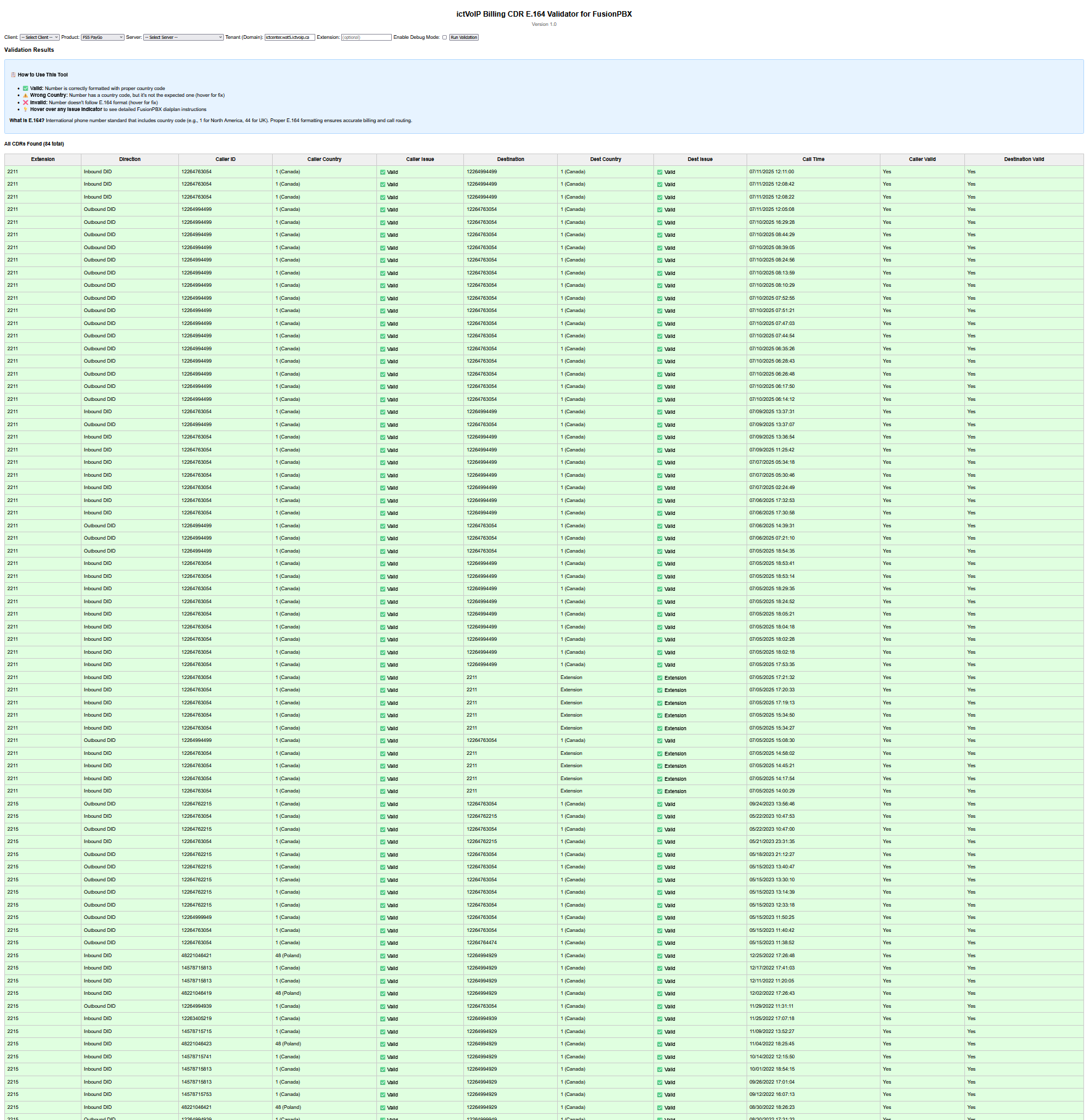
Figure: The ictVoIP Billing CDR E.164 Validator for FusionPBX, showing all valid results.
What is E.164?
E.164 is the international standard for phone number formatting that includes:
Country Code: 1 for North America, 44 for UK, 49 for Germany, etc.
National Number: The local phone number without country code
Total Length: 7-15 digits maximum
Example: +1-555-123-4567 (E.164 format) vs 555-123-4567 (missing country code)
Installation & Setup
System Requirements:
WHMCS with ictVoIP Billing addon installed
FusionPBX server module configured
Access to FusionPBX CDR class
Proper database permissions
Access Configuration:
Navigate to your WHMCS admin panel
Go to Addons → ictVoIP Billing
Click on CDR E.164 Validator
Database Integration:
The validator integrates with the following database tables:
mod_ictvoipbilling_country_codes - Country code definitions
mod_ictvoipbilling_extended_rates - Product tariff configuration
mod_ictvoipbilling_extended_rates_tariff - Country code assignments
tblhosting - Product domain/tenant information
Country Code Detection
Country codes are not set directly in the product configuration.
To determine the expected country code for validation:
Go to ictVoIP Billing Management in the admin area.
Click on Packages.
View the assigned product and check the associated Country Code in the Package Rates section.
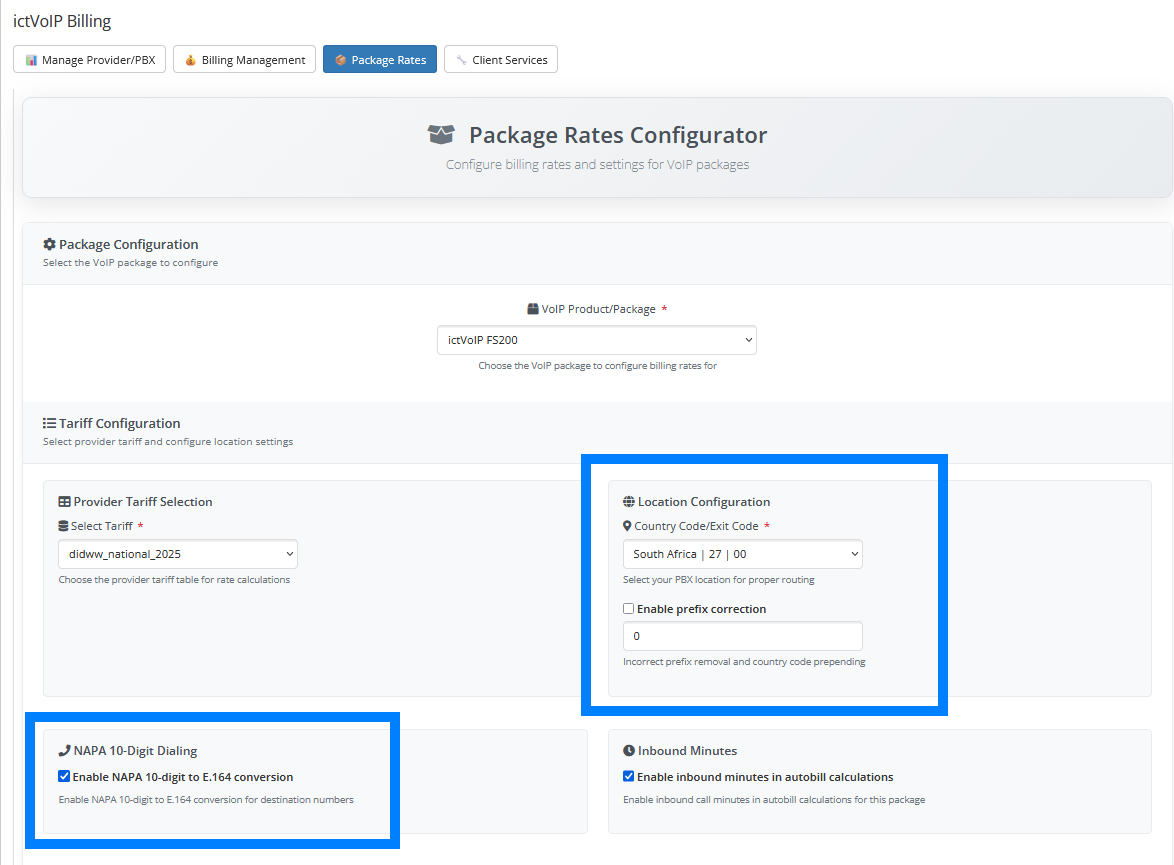
Figure: The Country Code is set in the Package Rates configuration for the assigned product/package. This is the code the validator expects for E.164 compliance.
Configuration
Product-Level Configuration:
Country codes are automatically detected from your package’s configuration (see above).
Go to ictVoIP Billing Management → Packages
Select the relevant package
Check the Country Code in the Package Rates section
Save configuration if changes are made
International Support:
The validator supports all international country codes and will:
Validate against the package’s configured country code
Flag numbers with wrong country codes
Provide appropriate dialplan fixes
Usage Guide
Step 1: Select Parameters
Client: Choose the client whose CDRs you want to validate
Product: Select the VoIP product (auto-populates tenant)
Server: Choose the FusionPBX server
Tenant: Domain/tenant (auto-populated from product selection)
Extension: Optional filter for specific extension
Debug Mode: Enable for detailed technical information
Step 2: Run Validation
Click “Run Validation” to fetch and analyze CDRs from FusionPBX.
Step 3: Review Results
The tool displays two tables:
All CDRs: Complete list with validation status
Invalid CDRs: Only problematic records requiring attention
Understanding the Results
Color-Coded Rows:
🟢 Green: Valid CDRs (no issues)
🔵 Blue: Inbound calls with issues
🟠 Orange: Outbound calls with issues
🔴 Red: Invalid CDRs
‘Extension’: Destination is a local extension (valid for inbound calls)
Issue Indicators:
✅ Valid
Number is correctly formatted with proper country code, or (for inbound) is a local extension.
⚠️ Wrong Country
Number has a country code, but it’s not the expected one for your package. (Not shown for inbound caller IDs; inbound calls can originate from any country.)
Example: Package configured for UK (44) but number has US country code (1)
Fix: Hover for dialplan command to add correct country code
❌ Invalid
Number doesn’t follow E.164 format (missing country code, too short, etc.).
Example: 5551234567 (missing country code)
Fix: Hover for dialplan command to add country code
‘Extension’
For inbound calls, if the destination is a local extension (e.g., 3-5 digits), it is recognized as valid and not flagged for E.164 issues.
FusionPBX Integration
Automatic Tenant Detection:
The tool automatically detects the tenant (domain) from your product’s hosting configuration, eliminating manual entry errors.
Direction-Aware Recommendations:
Inbound Calls: Uses
effective_caller_id_numbervariableOutbound Calls: Uses
destination_numbervariable
Copy-Paste Dialplan Commands:
Each issue includes a “Copy Command” button that provides the exact FusionPBX dialplan action needed:
set effective_caller_id_number=1\${caller_id_number}
set destination_number=1\${destination_number}
Troubleshooting
Common Issues:
“No CDRs Found” - Verify tenant/domain is correct, check FusionPBX server connectivity
“Could not find cdr_class.php” - Verify FusionPBX server module is installed, check file permissions
Tooltip Not Working - Ensure JavaScript is enabled, check for browser console errors
Debug Mode:
Enable Debug Mode to see:
Raw CDR data from FusionPBX
Country code detection process
Request parameters sent to CDR class
Technical Details
CDR Class Integration:
The tool integrates with the FusionPBX CDR class to:
Fetch live CDR data
Filter by tenant and extension
Process call direction information
Validation Logic:
Country Code Detection: Matches number against all country codes
Priority Matching: Prioritizes common countries (US, UK, etc.)
Length Validation: Ensures 7-15 digit total length
Package Code Comparison: Flags mismatched country codes (except for inbound caller IDs)
Extension Detection: For inbound calls, if the destination is a local extension (3-5 digits), it is treated as valid and not checked for E.164 compliance
Inbound Caller ID: Inbound caller IDs from outside the product country are not flagged as ‘Wrong Country’ (inbound calls can originate from any country)
Benefits
For Billing Accuracy:
Ensures proper E.164 formatting for accurate rate lookup
Prevents billing errors from malformed numbers
Validates international call routing
For System Administrators:
Quick identification of CDR formatting issues
Ready-to-use FusionPBX dialplan fixes
Comprehensive validation across all country codes
For Support Teams:
Clear visual indicators of issues
Detailed explanations for non-technical users
Copy-paste solutions for immediate implementation
Best Practices
Configuration Best Practices:
Set appropriate country codes for each package
Regularly validate CDRs for new clients
Use debug mode for initial setup verification
Monitor for patterns in formatting issues
Maintenance Best Practices:
Run validation after FusionPBX configuration changes
Check CDRs when adding new country codes
Validate before major billing runs
Document any custom dialplan changes
Next Steps
After setting up the CDR E.164 Validator:
Configure Package Country Codes: Ensure all VoIP packages have proper country codes set
Validate Existing CDRs: Run validation on existing clients to identify issues
Implement Dialplan Fixes: Use the provided commands to fix FusionPBX dialplans
Monitor Regularly: Set up regular validation checks for new CDRs
Train Support Team: Ensure support staff understand the validation indicators
Version History
Version 1.0:
Initial release
Live CDR validation from FusionPBX
International country code support
Copy-paste dialplan commands
Direction-aware recommendations
Auto-population of tenant from product
Debug mode for troubleshooting
—
This tool is specifically designed for use with the ictVoIP Billing system and FusionPBX integration.