Provider Management
VoIP Provider & PBX Configuration
Provider management allows you to configure VoIP providers and PBX systems, linking them to specific tariffs and package rates for automated billing and provisioning.
Overview
Providers in the ictVoIP Billing system represent VoIP service providers or PBX systems that you integrate with for billing and provisioning. Each provider is typically linked to one or more PBX servers (configured under Server Management) and can be associated with specific tariffs and packages, enabling flexible rate management and automated billing processes.
Key Features: * Multiple provider support * Custom tariff linking * Automated provisioning * Flexible rate management * Regional pricing support
Provider Configuration
Step 1: Access Provider Management
Navigate to your WHMCS admin panel: * ictVoIP Billing → Providers
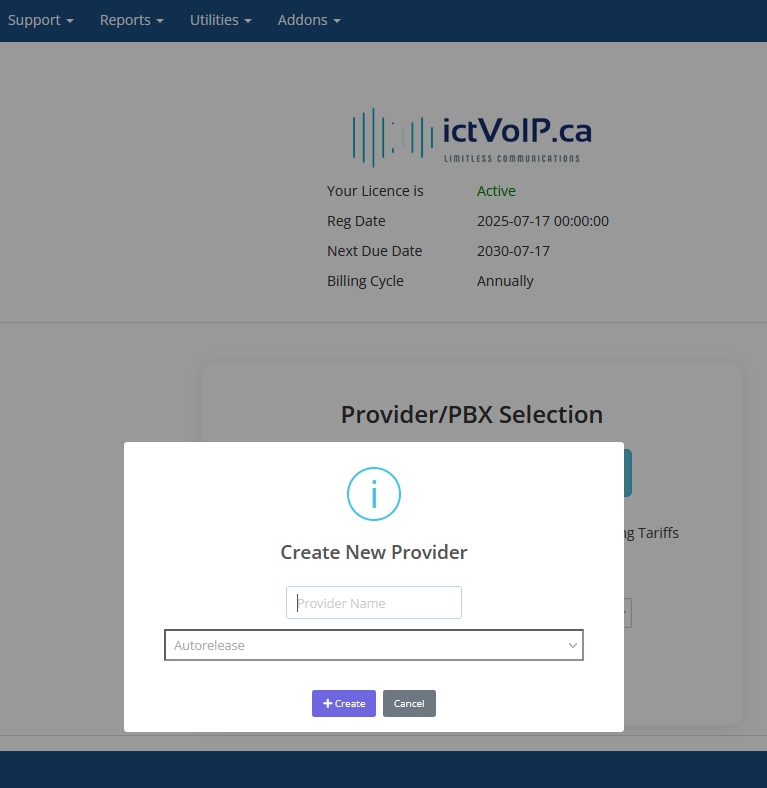
Step 2: Add New Provider
Click Add New Provider to create a new provider configuration.
Naming Convention:
Use a clear, descriptive naming convention for your providers:
Format: [PBX Vendor - Provider - Tariff]
Example: FusionPBX - Telnyx - Global
Naming Examples:
FusionPBX - Telnyx - Global - Standard global rates
FusionPBX - Twilio - North America - Regional pricing
Vodia - Bandwidth - International - International rates
Custom PBX - Local Provider - Local - Local rate structure
Configuration Options
Provider Types:
VoIP Providers - External SIP trunk providers
PBX Systems - Internal PBX platforms
Hybrid Systems - Combined provider/PBX setups
Rate Structure Options:
Global Rates - Standard pricing for all destinations
Regional Rates - Specific pricing for geographic regions
Custom Rates - Tailored pricing for specific needs
Tiered Rates - Volume-based pricing structures
Integration Features:
API Integration - Automated provisioning
Real-time Billing - Live usage tracking
CDR Processing - Call detail record management
Rate Management - Dynamic pricing updates
Tariff Linking
Linking Providers to Tariffs:
Each provider can be linked to specific tariffs for automated billing and provisioning. In a typical v1.4.0 deployment, a provider sits between one or more PBX servers and the tariffs/packages that define how usage is rated for client services.
Provider: FusionPBX - Telnyx - Global
Tariff: Global Standard Rates
Package: Basic VoIP Package
Benefits of Tariff Linking:
Automated Billing - Automatic rate application
Consistent Pricing - Standardized rate structures
Easy Management - Centralized rate control
Flexible Configuration - Multiple tariff options
Tariff Assignment:
Select the provider during configuration
Choose the appropriate tariff from the dropdown
Assign package rates if applicable
Save the configuration
Package Integration
Package Assignment:
Providers can be linked to specific service packages:
Package: Premium VoIP Service
Provider: FusionPBX - Telnyx - Global
Features: Unlimited local calls, 1000 international minutes
Package Configuration:
Service Limits - Call minutes, features, etc.
Rate Structure - Package-specific pricing
Billing Cycle - Monthly, quarterly, annual
Auto-renewal - Automatic package renewal
Regional Configuration
Geographic Rate Management:
Configure different rates for various regions:
Region: North America
Provider: FusionPBX - Telnyx - North America
Rates: Local $0.01/min, Long Distance $0.05/min

Region: Europe
Provider: FusionPBX - Telnyx - Europe
Rates: Local €0.02/min, International €0.10/min
Regional Benefits:
Competitive Pricing - Region-specific rates
Local Presence - Geographic optimization
Cost Efficiency - Optimized provider selection
Customer Satisfaction - Localized service
Best Practices
Provider Naming:
Use descriptive, consistent names
Include vendor and tariff information
Avoid special characters
Keep names concise but informative
Configuration Management:
Document all provider settings
Maintain backup configurations
Regular rate reviews and updates
Monitor provider performance
Security Considerations:
Secure API credentials
Regular password updates
Access control management
Audit trail maintenance
Troubleshooting
Common Issues:
Provider Not Found - Check naming and configuration
Rate Mismatch - Verify tariff linking
API Errors - Check credentials and connectivity
Billing Issues - Review rate configuration
Debug Steps:
Verify provider configuration
Check tariff assignments
Test API connectivity
Review error logs
Support Information:
For provider-related issues, provide: * Provider name and configuration * Error messages and logs * Tariff and package details * API credentials (if applicable)
Next Steps
After configuring providers:
Tariff Setup - Configure rate structures.
Package Creation - Create service packages.
Client Assignment - Assign providers to clients and services.
Billing Configuration - Set up automated billing.
Provisioning Flow Review - See Provisioning Overview for how providers, tariffs, PBX servers, and WHMCS products work together in the end-to-end provisioning process.