FusionPBX API Endpoints
Overview
This document provides an overview of the API endpoints available for FusionPBX integration. These endpoints enable programmatic access to FusionPBX functionality for external system integration and automation.
Authentication
The endpoint now uses IP/CIDR-based whitelisting for authentication.
Authentication Requirements:
API username / password & whitelisted IPs.
Requests from non-whitelisted IPs will be denied and logged.
Whitelist is managed in chkcon_whitelist.conf or use out tool Whitelist Manager.
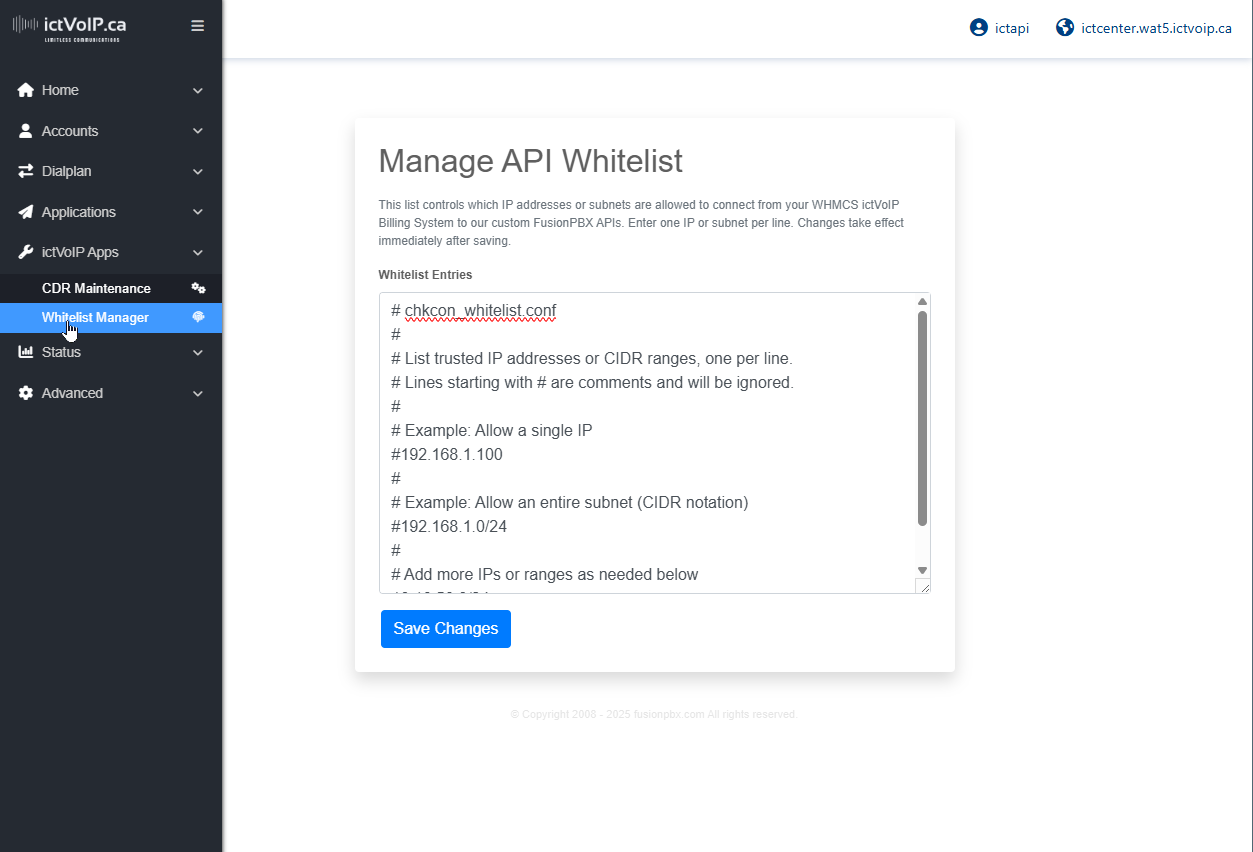
Response Examples:
{
  "success": 1,
  "message": "API Access Granted: Whitelisted IP"
}

{
  "success": 0,
  "message": "API Access Denied: Only whitelisted IPs may access this endpoint."
}
WHMCS Integration Note
When configuring the FusionPBX server in WHMCS, the “Test Connection” button now checks API access based on the IP whitelist. Username and password fields are not required for this endpoint. Ensure your WHMCS server’s public IP is included in chkcon_whitelist.conf on the FusionPBX server.
API Endpoints
Status Endpoint
Purpose: System health and status monitoring within WHMCS Admin Dashboard
Endpoint: /app/status/index.php
Method: POST
Parameters: * Username (required): Administrator username * Password (required): Administrator password * Whitelisted (required): Whitelist Managed
Response Format:
{
  "status": "success",
  "message": "System operational",
  "timestamp": "2024-01-15T10:30:00Z",
  "version": "5.3.8",
  "uptime": "7 days, 3 hours",
  "active_calls": 5,
  "total_extensions": 150,
  "registered_extensions": 142
}
Usage Example:
curl -X POST https://your-fusionpbx.com/app/status/index.php \
  -d "username=admin&password=your-password"
Registration Status Endpoint
Purpose: Check extension registration status
Endpoint: check_registration.php
Method: POST
Parameters: * Username (required): Administrator username * Password (required): Administrator password * Extension (required): Extension number to check * Tenant Domain (required): Domain/tenant identifier
Response Format:
{
  "status": "success",
  "message": "Extension status retrieved",
  "registered": "yes",
  "register_ip": "192.168.1.100",
  "register_port": "5060",
  "register_useragent": "SIP Client/1.0"
}
Usage Example:
curl -X POST https://your-fusionpbx.com/app/registrations/check_registration.php \
  -d "username=admin&password=your-password&extension=1001&tenant_domain=yourdomain.com"
Gateway Management Endpoint
Purpose: Manage SIP gateway configurations
Endpoint: provision.php
Method: POST
Parameters: * Username (required): Administrator username * Password (required): Administrator password * Gateway Name (required): Unique gateway identifier * Gateway Domain (required): Gateway server address * Gateway Username (required): Gateway authentication username * Gateway Password (required): Gateway authentication password
Response Format:
{
  "status": "success",
  "message": "Gateway configured successfully",
  "gateway_uuid": "550e8400-e29b-41d4-a716-446655440000",
  "gateway_name": "primary_gateway",
  "gateway_domain": "sip.provider.com",
  "gateway_enabled": "true"
}
Usage Example:
curl -X POST https://your-fusionpbx.com/app/gateways/provision.php \
  -d "username=admin&password=your-password&gateway_name=primary_gateway&gateway_domain=sip.provider.com&gateway_username=account&gateway_password=password"
Gateway List Endpoint
Purpose: Retrieve configured gateway information
Endpoint: provision_list.php
Method: POST
Parameters: * Username (required): Administrator username * Password (required): Administrator password
Response Format:
{
  "status": "success",
  "message": "Gateways retrieved successfully",
  "gateways": [
    {
      "gateway_uuid": "550e8400-e29b-41d4-a716-446655440000",
      "gateway_name": "primary_gateway",
      "gateway_domain": "sip.provider.com",
      "gateway_enabled": "true",
      "gateway_status": "UP"
    }
  ]
}
Usage Example:
curl -X POST https://your-fusionpbx.com/app/gateways/provision_list.php \
  -d "username=admin&password=your-password"
CDR Export Endpoint
Purpose: Export call detail records for billing and reporting
Endpoint: export_cdr.php
Method: POST
Parameters: * Username (required): Administrator username * Password (required): Administrator password * Date Start (required): Start date for CDR export * Date End (required): End date for CDR export * Format (optional): Export format (JSON, CSV, XML)
Response Format:
{
  "status": "success",
  "message": "CDR export completed",
  "total_records": 1250,
  "date_range": "2024-01-01 to 2024-01-31",
  "export_format": "JSON"
}
Usage Example:
curl -X POST https://your-fusionpbx.com/app/xml_cdr/export_cdr.php \
  -d "username=admin&password=your-password&date_start=2024-01-01&date_end=2024-01-31&format=JSON"
Error Handling
All API endpoints return consistent error responses in the following format:
{
  "status": "error",
  "message": "Descriptive error message",
  "timestamp": "2024-01-15T10:30:00Z"
}
Common Error Codes:
Authentication Failed: Invalid credentials
Missing Parameters: Required parameters not provided
Invalid Request: Malformed request data
Server Error: Internal system error
Rate Limited: Too many requests
Rate Limiting
API endpoints implement rate limiting to prevent abuse and ensure system stability.
Rate Limits:
Standard Endpoints: 100 requests per minute
CDR Export: 10 requests per minute
Gateway Operations: 50 requests per minute
Rate Limit Headers:
X-RateLimit-Limit: 100
X-RateLimit-Remaining: 95
X-RateLimit-Reset: 1642234560
Security Considerations
Network Security:
Use HTTPS for all API communications
Implement proper firewall rules
Consider VPN access for sensitive operations
Authentication Security:
Use strong, unique passwords
Implement API key rotation
Monitor authentication attempts
Data Protection:
Encrypt sensitive data in transit
Implement proper access controls
Regular security audits
Monitoring and Logging:
Log all API access attempts
Monitor for suspicious activity
Regular security assessments